
Agiloft becomes much more powerful when it is treated as part of an enterprise ecosystem rather than an isolated contract repository.
A CLM platform may need to exchange information with ERP systems, identity providers, KYC services, eSignature platforms, ITSM tools, CRM platforms and internal databases.
The challenge is not simply making an API call. The real challenge is deciding where integration logic should live, how state should be synchronised and how failures should be handled without breaking the contract process.
A common architecture
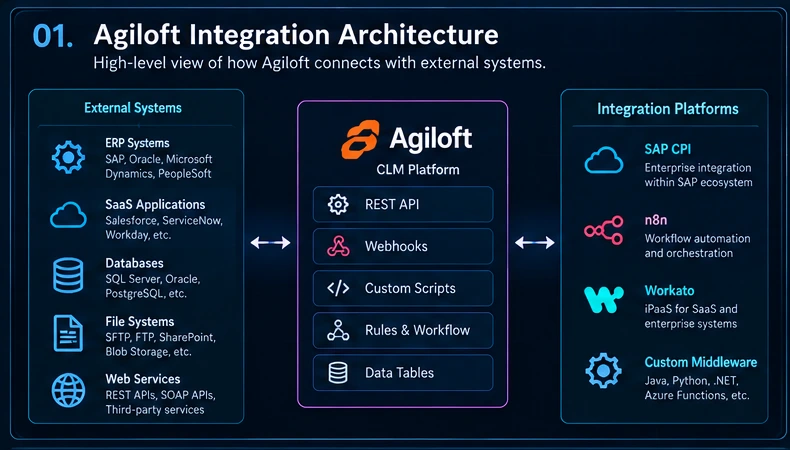
The integration layer may be n8n, SAP Integration Suite, a custom service or another middleware platform. For simple use cases, Agiloft can also communicate directly with an external API.
Start with the business event
Before selecting an endpoint, define what should trigger the process.
Examples include contract approval, signature submission, compliance verification, company updates, signed-document completion or renewal events.
The integration should follow the business process rather than forcing the business process to follow the API.
Outbound integrations
An outbound integration begins in Agiloft.
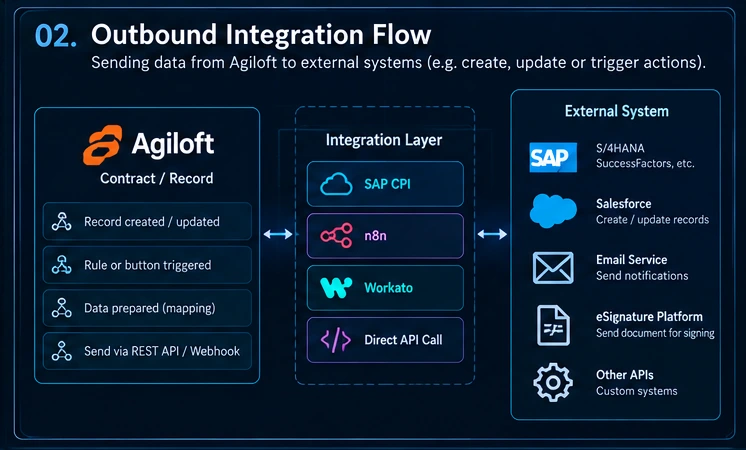
Typical use cases include creating a signing envelope, sending metadata to ERP, triggering KYC verification or creating an ITSM request.
Important questions include:
- Which fields are mandatory?
- When may the request fire?
- What prevents duplicates?
- Where is the external ID stored?
- What happens when the API call fails?
The external system's identifier should normally be stored back in Agiloft so the two records remain traceable.
Inbound integrations
Inbound integrations update Agiloft after an external event.
A common example is an eSignature completion webhook:
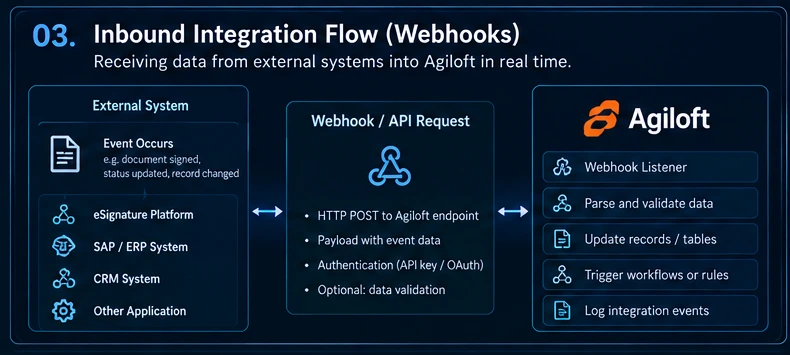
This is usually preferable to constant polling when the external platform supports dependable webhooks.
Direct integration versus middleware
Direct integration may be appropriate when the process is simple, transformation is minimal and only one API is involved.
Middleware becomes more useful when multiple systems are involved, transformations are complex, webhook verification is required, retries matter or monitoring needs to be centralised.
A useful principle is: keep Agiloft responsible for contract workflow and keep complex integration orchestration in the integration layer.
Authentication
External APIs may use OAuth 2.0 client credentials, bearer tokens, API keys, Basic Authentication, mutual TLS or signed requests.
Credentials should not be hard-coded in workflow text or exposed in logs. If middleware is used, it can become a controlled location for secret and token management.
Field mapping
Many integration issues are really data-mapping issues.
Create a mapping table that clearly records the Agiloft field, external field, direction and transformation rule.
For example:
| Agiloft Field | External Field | Direction | Rule |
|---|---|---|---|
| Contract ID | external_reference | Outbound | Required |
| Company Name | legal_name | Outbound | Trim |
| External Status | verification_status | Inbound | Map to choice value |
| External ID | application_id | Inbound | Persist |
Treat this mapping as part of the technical design.
Avoid duplicate transactions
Buttons, rules and retries can trigger the same process more than once.
Use visible integration state, for example:
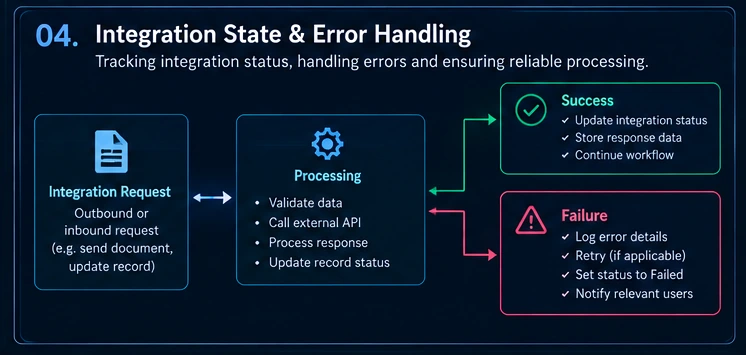
Useful supporting fields include external transaction ID, last request time, retry count and last error.
Webhook verification
Many platforms verify webhook endpoints before sending real events. Verification may use challenge values, verification headers, shared secrets or HMAC signatures.
Handle verification separately from normal business-event processing and do not weaken webhook security simply to make testing easier.
Signed-document retrieval
A typical completion flow is:

Consider file size, file type, version handling, duplicate attachments and expiring download links.
Polling when webhooks are unavailable
Polling can be a valid fallback.
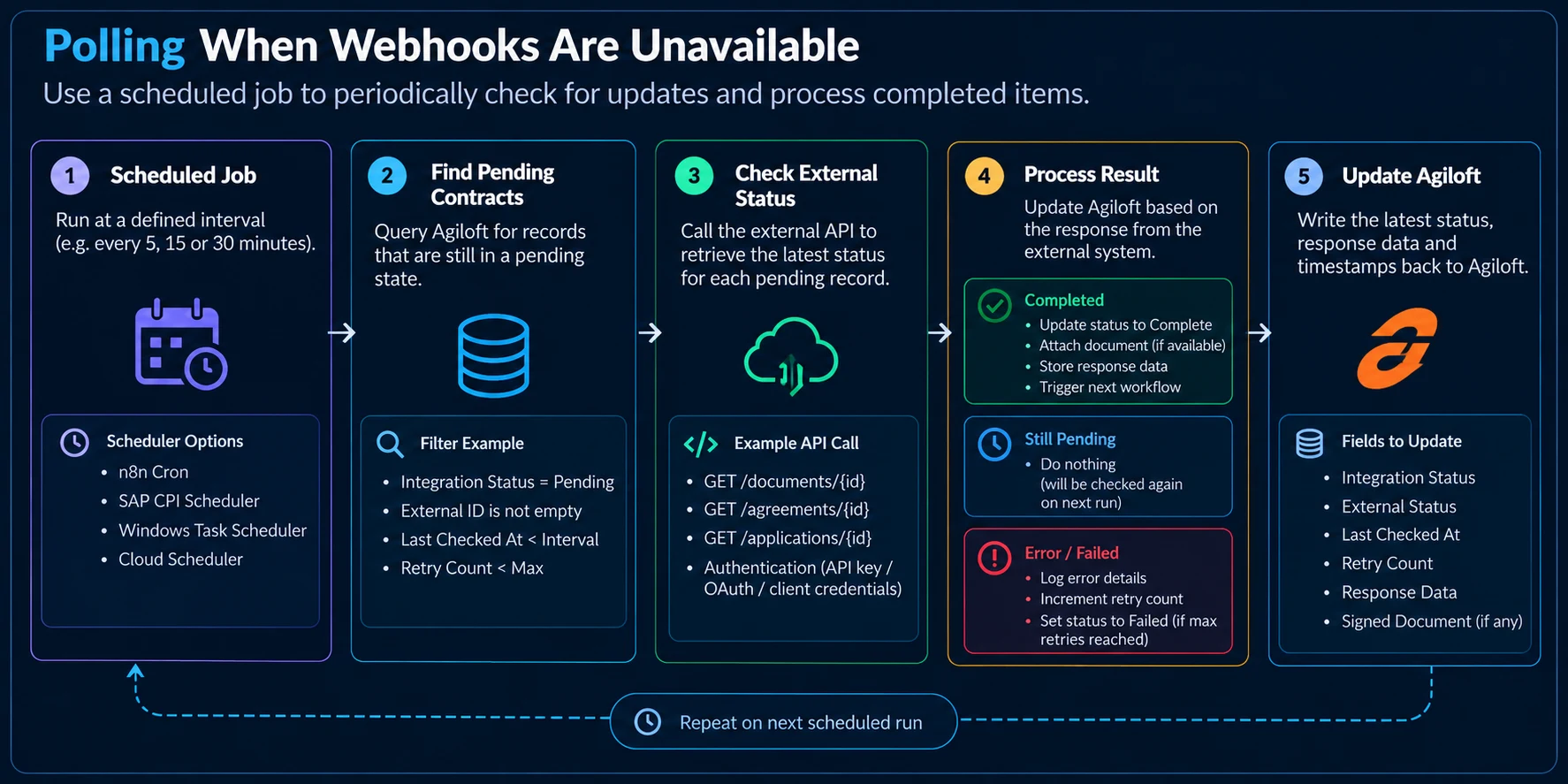
Choose an interval that matches the business need without unnecessarily consuming API capacity.
Separate business state from integration state
These are not always the same.
For example:
Contract Status = Awaiting Signature
Integration Status = Successfully Submitted
Signature Status = Pending
Combining all of this into one field often creates confusing workflow logic.
Security and privacy
Contract systems often contain sensitive commercial and personal data.
Follow least-privilege principles: send only necessary fields, protect credentials, avoid logging full sensitive payloads, encrypt transport and validate inbound requests.
Final thoughts
Agiloft integrations are most successful when contract workflow, integration orchestration and external-platform behaviour are kept clearly separated.
The technical objective is not merely to make an API call succeed. It is to create a traceable, supportable and secure business process that remains reliable after go-live.