
Electronic signature integrations often look simple on the surface: send a document, get it signed and bring it back.
In production, the workflow usually involves document preparation, signing roles, authentication, external identifiers, status updates, webhook events and final-document retrieval.
A reliable architecture has to coordinate all of these stages.
The basic lifecycle
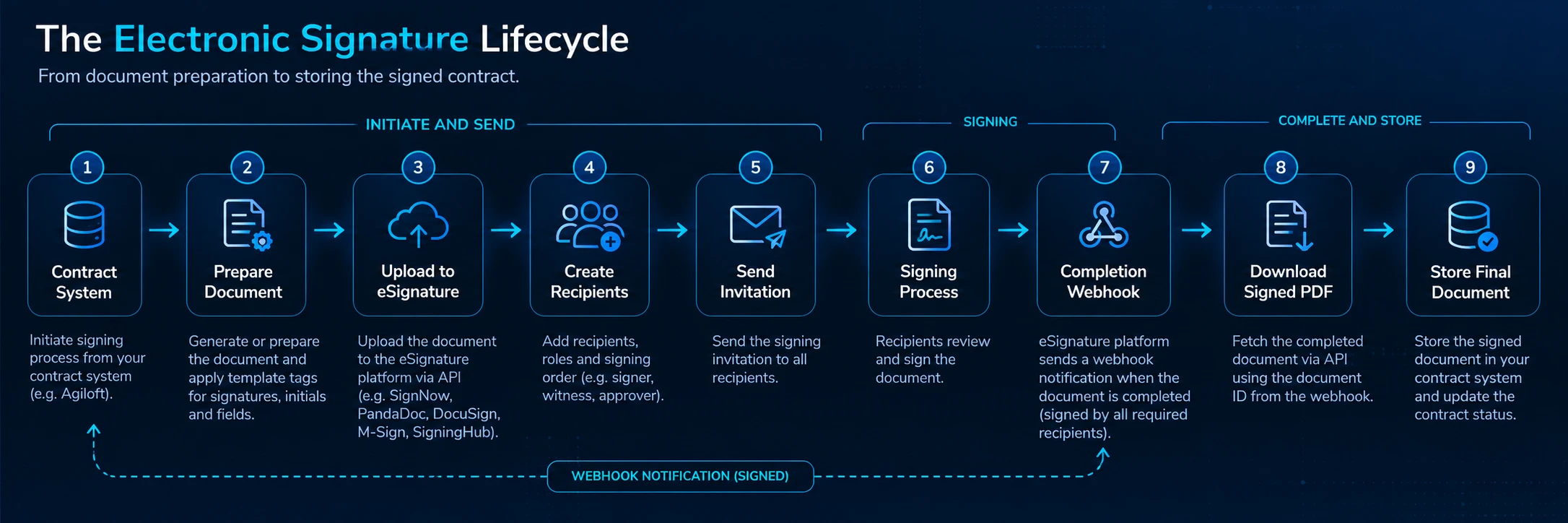
Each stage should have a visible state.
Validate before sending
Do not send a document simply because a user clicked a button.
Validate that the document exists, required signers are present, email addresses are valid, roles are configured, compliance requirements are complete and the document has not already been submitted.
Prepare the document
Different eSignature platforms use different methods for field placement, including text tags, anchor tags, template fields and API-defined coordinates.
Document preparation should account for signatures, initials, dates, witnesses, roles, field size and page position.
Tagging conventions should remain predictable across template versions.
Store the external document ID
When the document is uploaded, the eSignature platform normally returns an identifier.
internal_contract_id = 15709
external_document_id = 7ab2c...
Persist this immediately. It becomes the key for invitations, status checks, webhook matching and document downloads.
Map signer roles explicitly
A robust integration should not rely only on array position.
Use explicit business roles such as Tenant, Landlord, Witness or Internal Signer and map those roles to the eSignature platform's recipient model.
The contract system should own the business role; the signing platform owns the signing configuration.
Send the invitation
The request may include signer name, email, role, subject, message, signing order, expiry and authentication settings.
Record enough integration state to prevent duplicate invitations.
Track status
Common external states include Draft, Sent, Viewed, Partially Signed, Completed, Declined, Expired and Cancelled.
Your contract platform may use different internal terminology, so create an explicit mapping rather than copying external statuses directly into business workflow.
Use webhooks for events
Webhooks are normally the most efficient way to receive real-time changes.
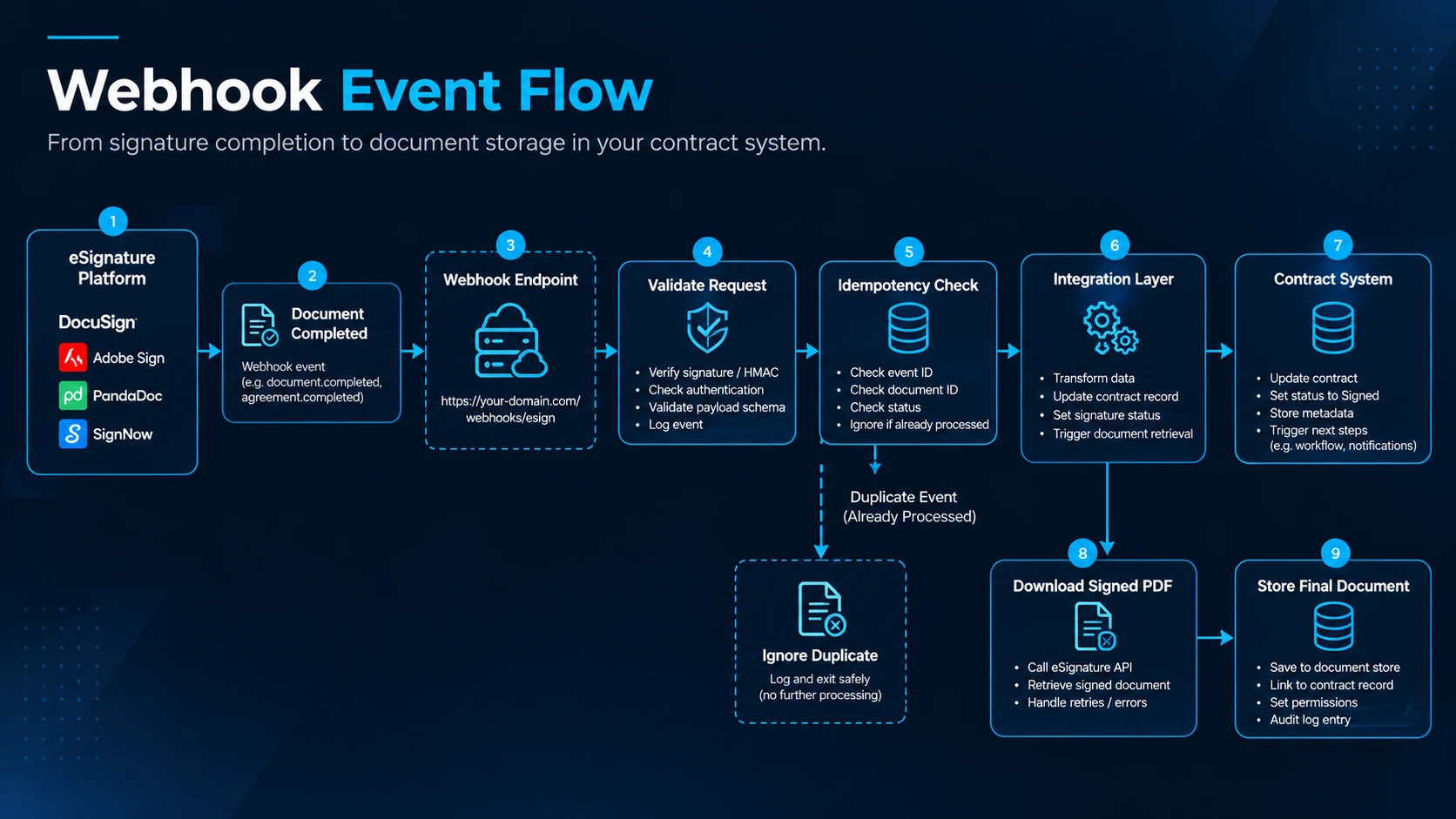
Webhook processing should be authenticated and idempotent.
Retrieve the signed document
A completion webhook may not include the actual file.
A typical sequence is:
- Receive completion event
- Extract document ID
- Call document-download endpoint
- Retrieve PDF
- Upload PDF to contract system
- Update status
This step also needs to handle duplicate events and expiring download URLs.
Preserve the audit trail
Depending on the provider and legal requirements, it may be useful to retain the completion certificate, signing timestamps, audit events and other evidence artefacts alongside the final PDF.
Polling fallback
If webhooks are unavailable, polling can be used to check pending signature requests periodically.
Webhooks are generally more efficient, but polling remains a valid fallback when implemented responsibly.
Design for partial failure
Consider scenarios such as:
- Upload succeeds but invitation fails
- Invitation succeeds but local update fails
- Completion webhook arrives twice
- Signed-document download fails
- A signer declines
- A download URL expires
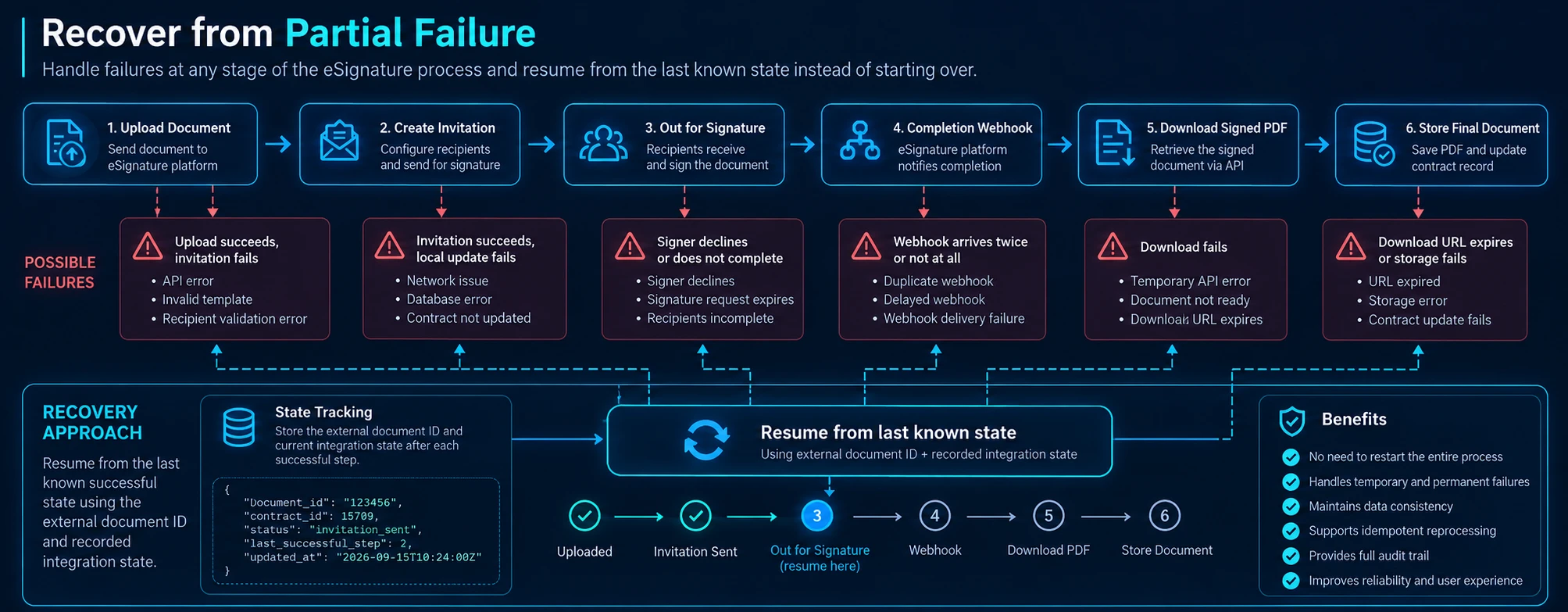
Do not restart the entire process blindly. Resume from the correct stage using the external ID and recorded integration state.
Keep integration state separate
A useful state model might include:
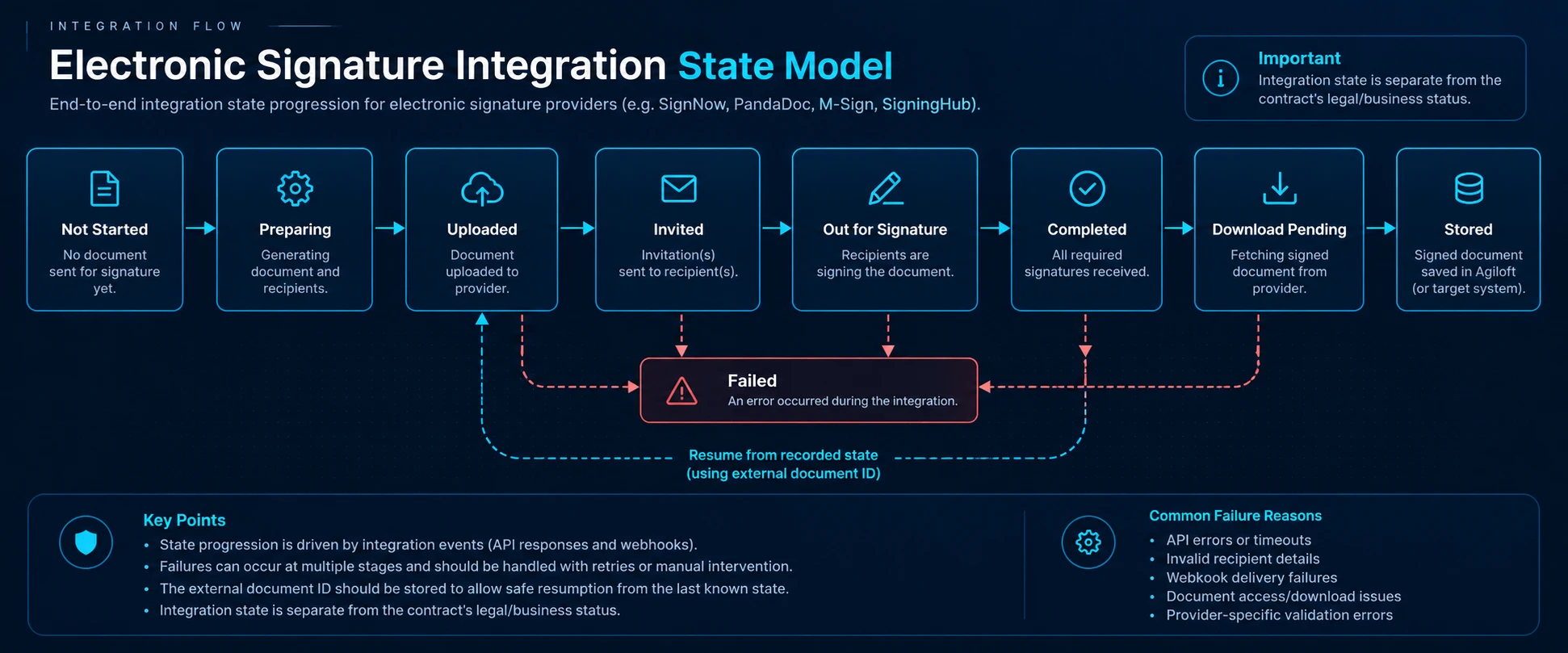
This integration state can exist separately from the contract's legal or business status.
Middleware architecture
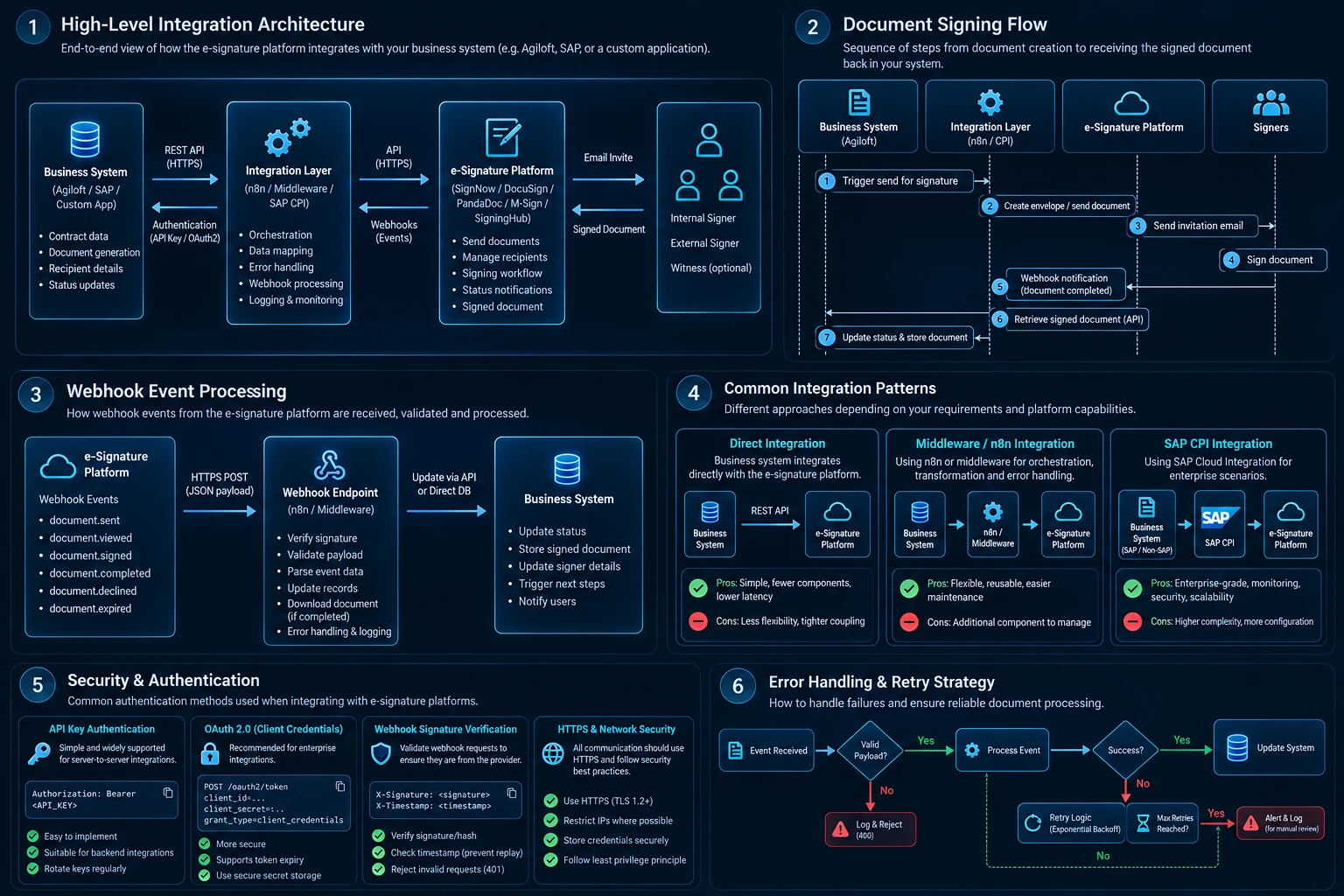
This is especially useful when an organisation supports multiple eSignature providers.
Multiple signing providers
A canonical internal signer model can reduce vendor-specific complexity.
The integration layer can transform a common internal representation into the payload required by each provider.
This prevents the contract system from becoming tightly coupled to one vendor's API structure.
Security
eSignature processes handle commercially sensitive documents and personal information.
Use HTTPS, secure credential storage, least privilege, webhook validation and controlled logging. Avoid recording entire signed documents or sensitive payloads in integration logs.
Final thoughts
A good eSignature integration is not simply a "Send for Signature" button. It is a stateful document workflow spanning multiple systems.
The architecture should reliably answer what was sent, who must sign, what the current status is, whether an event has already been processed and where the final document is stored.
When those questions are designed into the integration from the start, electronic signature becomes a dependable part of the contract lifecycle rather than a fragile external step.