
n8n is often described as an automation tool, but it can also be an effective integration layer for API-driven enterprise workflows.
Its strength is that orchestration remains visible.
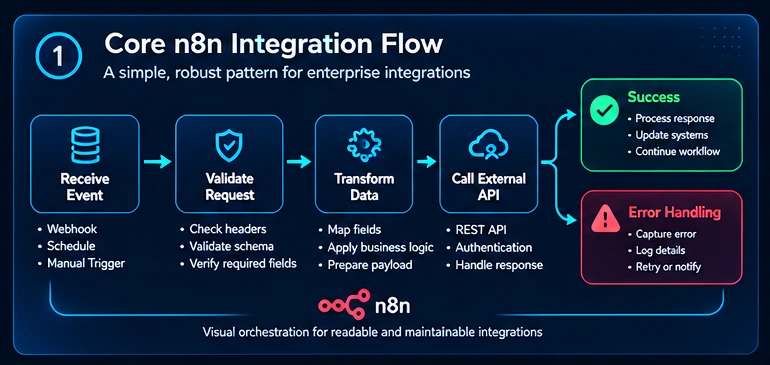
That visibility can make development and production support much easier.
Start with the integration contract
Before adding nodes, define the trigger, input schema, output, authentication, systems involved, error behaviour, expected volume and support ownership.
A visually attractive workflow can still be poorly engineered.
Webhook-triggered workflows
One of n8n's strongest patterns is webhook processing.
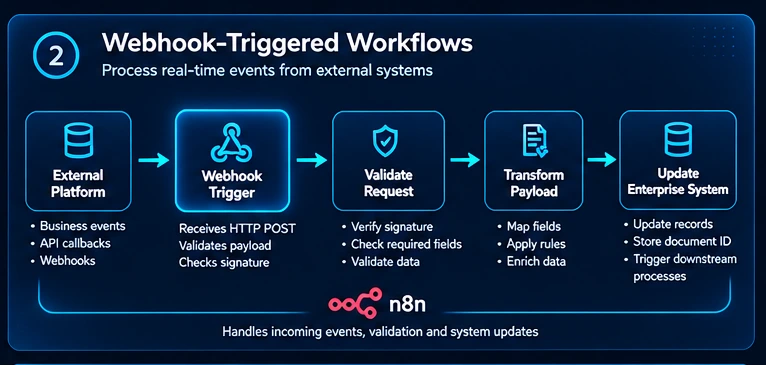
Validate required headers, signatures, event types and required identifiers before processing the business action.
Scheduled workflows
Polling is useful when the source platform does not support webhooks.
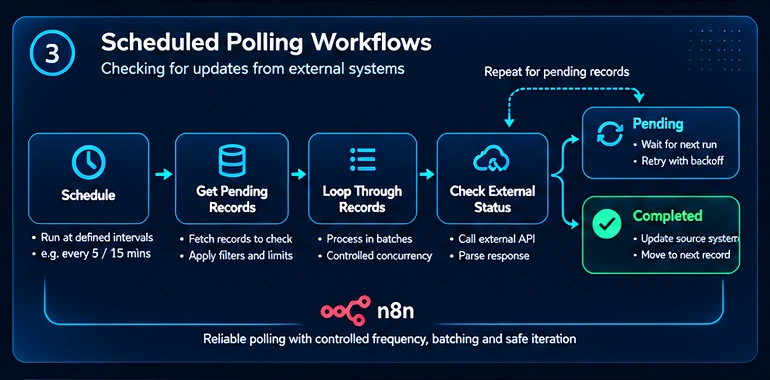
Choose polling frequency based on the business process rather than convenience.
Keep credentials out of workflow logic
Use managed credentials rather than manually inserting secrets into HTTP headers or code nodes.
This is especially important for OAuth client secrets, API keys, database passwords and bearer tokens.
Use clear workflow stages
Complex flows are easier to maintain when they follow predictable stages:
- Trigger
- Validate
- Enrich
- Transform
- Execute
- Confirm
- Log
- Notify
Node names should describe business actions. Get Contract Details is far more useful than HTTP Request 17.
Reuse common logic
If many workflows perform the same token retrieval, transformation or error-notification logic, move that behaviour into reusable components where possible.
Duplication makes future changes risky.
Design explicit error paths
Production workflows should anticipate API timeouts, authentication failures, HTTP 429 responses, HTTP 500 errors, missing data and malformed responses.
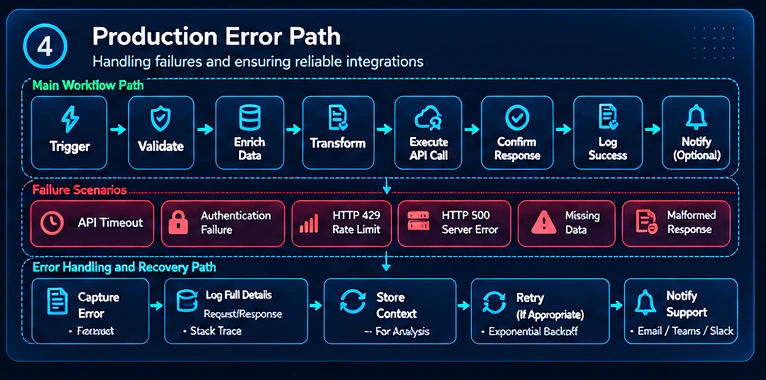
A failure path may capture the error, store context, update integration status, notify support and retry only where appropriate.
Avoid giant Code nodes
Code nodes are useful, but if the whole workflow becomes one large script, much of the value of a visual integration platform is lost.
Use code for logic that genuinely benefits from it. Keep orchestration visible.
Make workflows idempotent
A webhook may arrive twice and a scheduled job may retry.
Before creating a target record, check whether the business action has already happened using an event ID, contract ID, agreement ID or source-system reference.
Handle pagination intentionally
An API that returns the first 50 records may appear to work perfectly until record 51 exists.
Inspect the provider's pagination model: page/page_size, offset/limit, cursor or next URL.
Never assume one API call returns the full dataset.
Respect rate limits
Use batching, controlled concurrency, delay and Retry-After handling where appropriate.
Integration speed should not come at the expense of API stability.
Correlation and logging
Useful metadata includes workflow name, execution ID, source record ID, target record ID, correlation ID and processing status.
Avoid logging sensitive payloads unless there is a justified operational need.
Treat production differently
Production workflows should have controlled credentials, stable endpoints, defined owners, alerting, backup/export strategy and change control.
Do not treat the production instance like a development sandbox.
Example: contract-signing orchestration

This is a strong example of orchestration that benefits from a visual integration layer.
Final thoughts
The difference between an automation workflow and an enterprise integration workflow is operational discipline.
A production n8n workflow should be secure, traceable, idempotent, maintainable, monitored and designed for failure.
When those principles are applied, n8n can become much more than a convenience automation tool. It can serve as an effective integration layer for API-driven enterprise processes.