
SAP Cloud Integration, still commonly called SAP CPI, is one of the most important capabilities within SAP Integration Suite. It gives organisations a powerful way to connect SAP and non-SAP systems, transform data, orchestrate processes and expose reusable integration services.
The difficult part is rarely getting the first message from system A to system B. The difficult part is building an integration that remains secure, understandable and supportable months or years after go-live.
Design before you build
Before opening the iFlow designer, define the source and target systems, trigger, payload format, authentication, transformation rules, error handling, retry strategy, expected volume and support ownership.
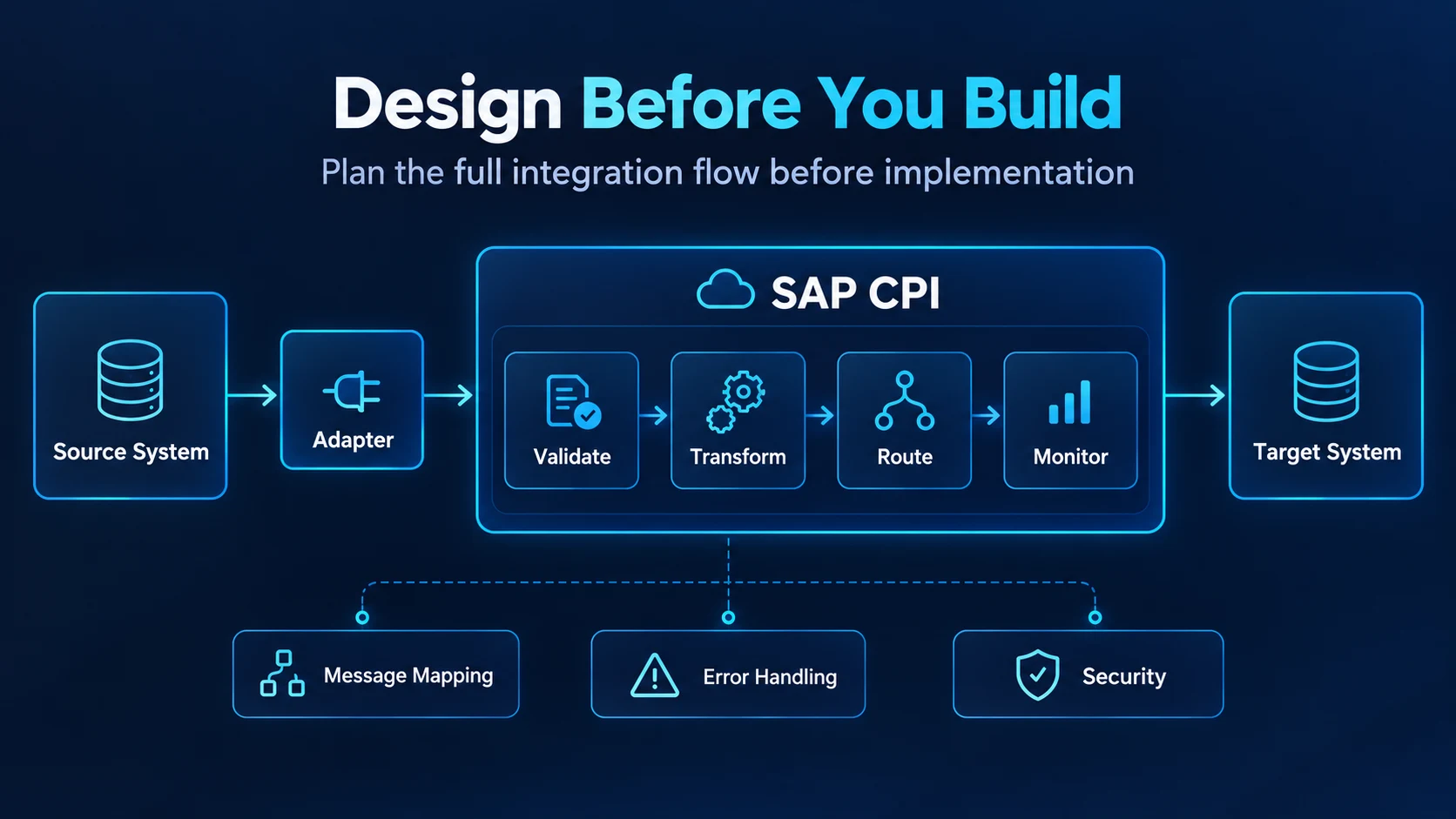
The iFlow should implement an understood integration design rather than become the place where the design is discovered.
Keep iFlows focused
An iFlow should have a clear responsibility. If one process is handling customer creation, supplier updates, invoice processing and notifications, it is probably doing too much.
Smaller, focused integrations are easier to test, troubleshoot, deploy and change safely. Common logic can be separated into reusable flows or shared resources where appropriate.
Externalise configuration
Values that differ between DEV, QA and PROD should not be buried inside the iFlow.
Examples include endpoint URLs, SFTP folders, email addresses, API paths, partner identifiers, timeouts and feature flags.
The same integration package should be transportable between environments with only configuration changes.
Never hard-code secrets
Credentials, API keys, OAuth client secrets, passwords and private keys belong in secure credential stores. They should not appear in Groovy scripts, logs, screenshots, documentation or source-control repositories.
Security should be part of the architecture, not something added shortly before production.
Use Groovy deliberately
Groovy is powerful, but it should not become the default answer to every requirement.
Before scripting, consider native CPI capabilities such as Content Modifier, Message Mapping, XSLT, Router, Filter and standard conversion steps.
When Groovy is appropriate, keep scripts small, readable and focused. Handle null values, avoid hidden business rules and comment logic that is not obvious.
Build explicit error handling
A successful happy path is only half an integration.
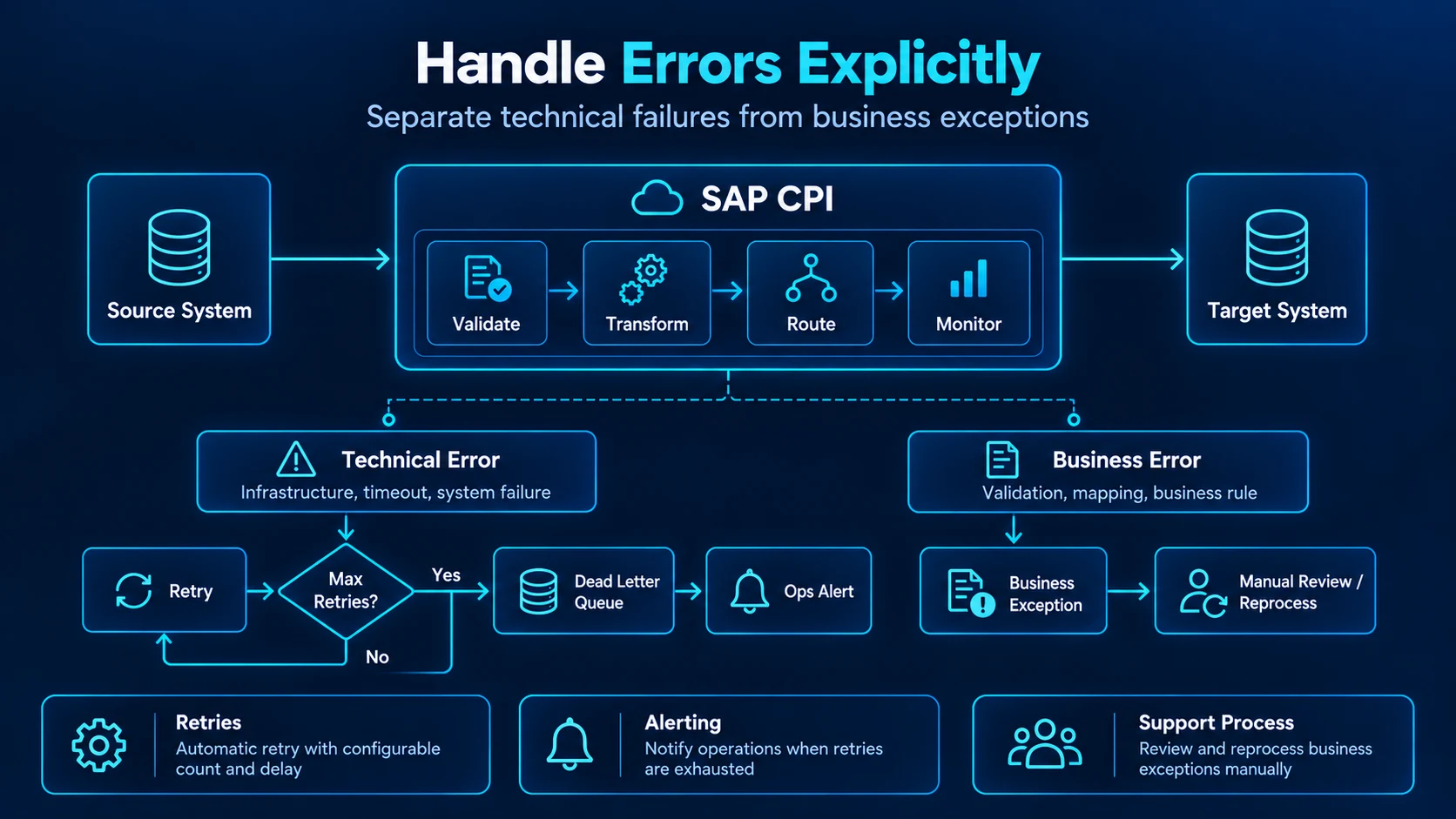
Every production interface should answer:
- What happens if the target is unavailable?
- What happens if authentication fails?
- What happens if the payload is invalid?
- What happens if the same message is processed twice?
- What information will support teams have when something fails?
Use exception subprocesses where appropriate and capture meaningful diagnostic information such as integration name, correlation ID, timestamp, failure stage and sanitised error message.
Design for idempotency
Enterprise integrations frequently retry messages. If a request is sent twice, the target should not accidentally create two business records.
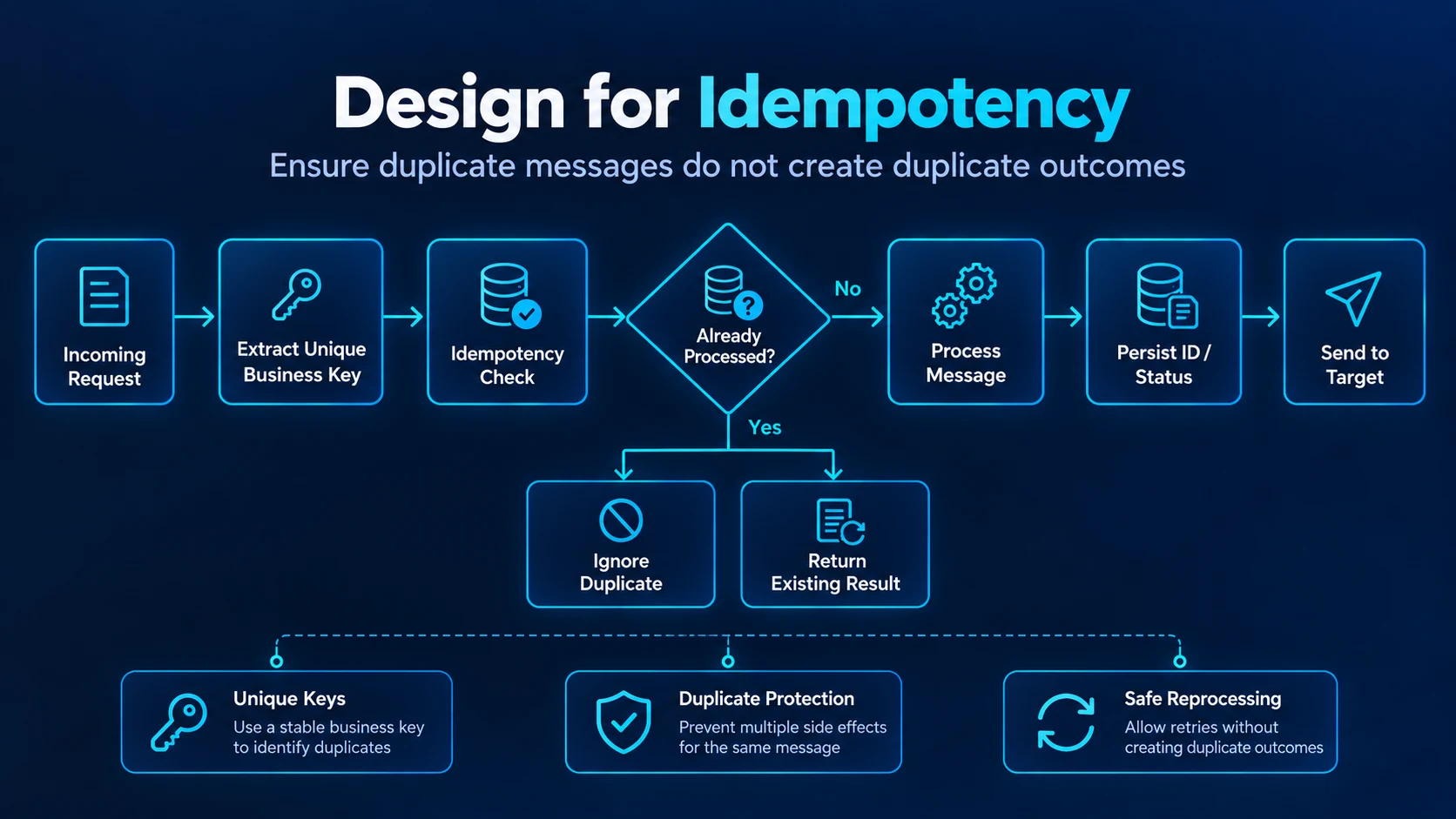
Useful approaches include business keys, external reference IDs, unique transaction IDs, duplicate checks and upsert operations.
This matters especially for financial transactions, contracts, employees, orders and other records where duplication has a business impact.
Treat monitoring as part of the solution
A production integration is not finished when a single test message succeeds.
You also need to know whether messages are flowing, how many are failing, why they are failing, whether processing time is increasing and whether certificates or credentials are approaching expiry.
Supportability should influence the design from the beginning.
Use correlation IDs
A correlation ID makes it possible to trace a transaction across systems.
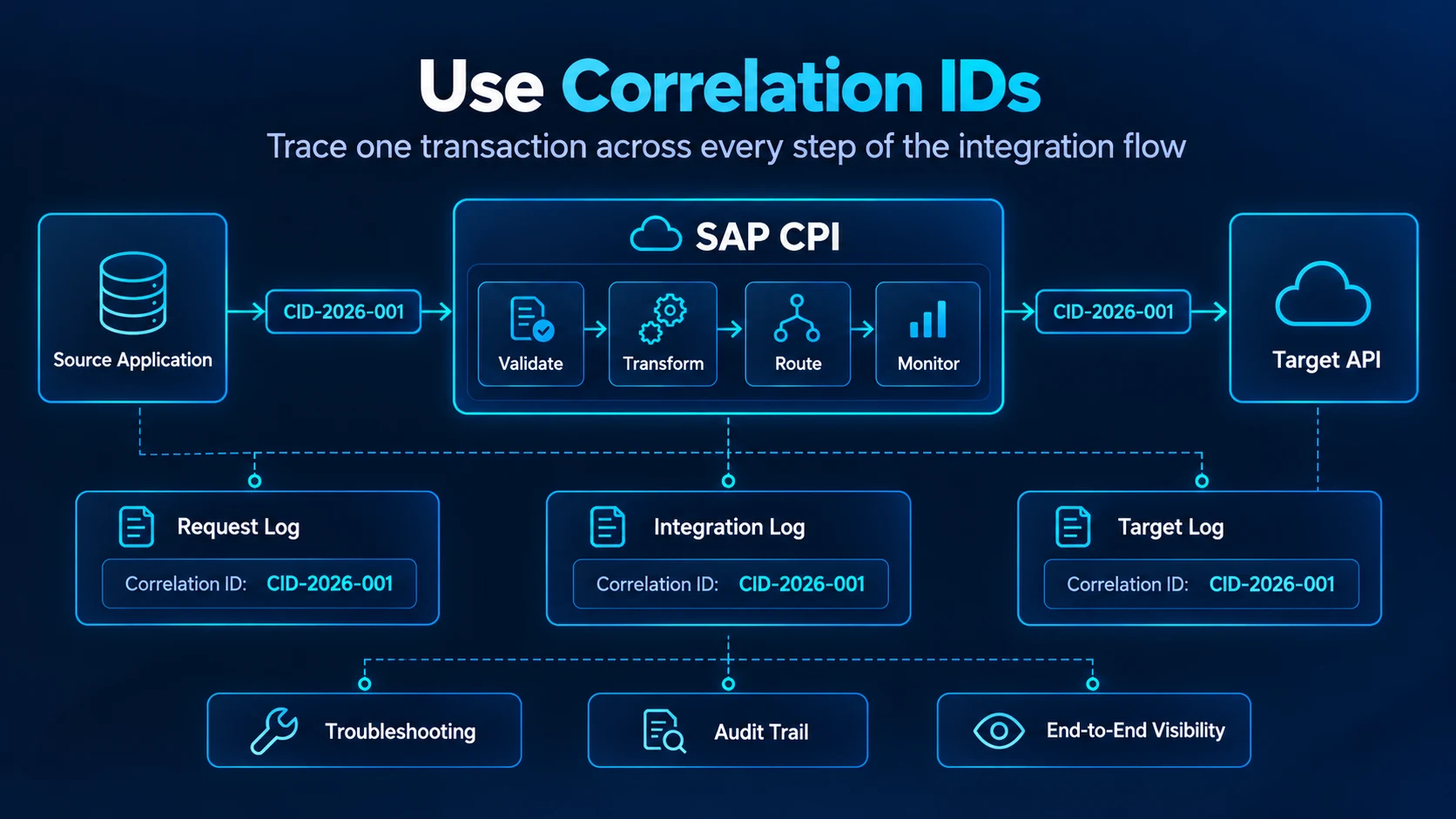
When an incident is raised, support teams can search for one identifier instead of manually comparing timestamps and payloads.
Validate messages early
Reject invalid data before doing unnecessary work.
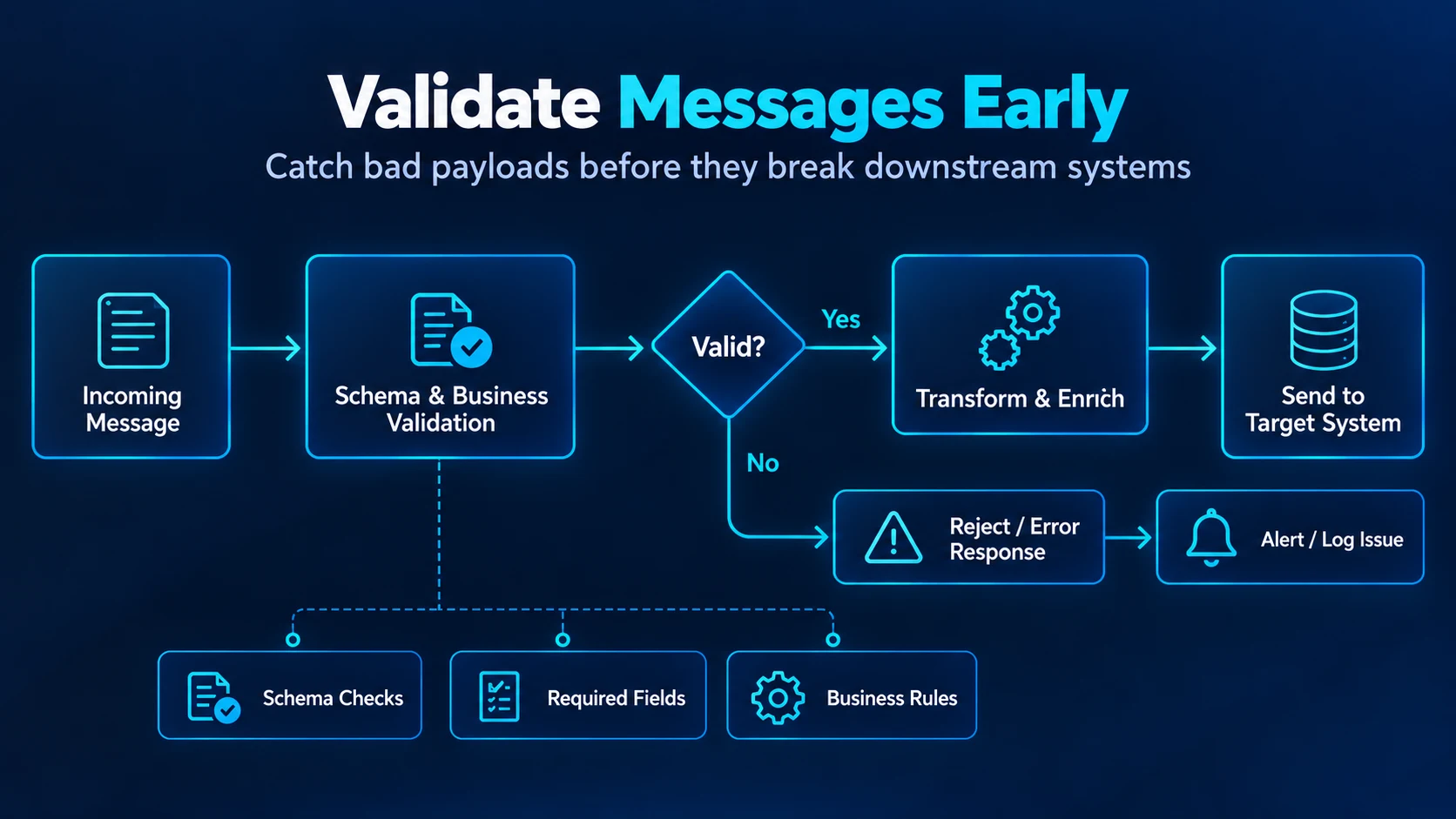
There is little value in performing complex transformations on a payload that is already known to be unusable.
Separate technical and business errors
A timeout or HTTP 503 is different from a business error such as "supplier not found" or "contract not approved".
Technical failures may be retryable. Business failures often require correction rather than repeated automatic retries.
Treating every failure in the same way creates noisy and unreliable integrations.
Document the interface
For every significant integration, maintain concise technical documentation covering purpose, architecture, source and target, authentication, mapping, error handling, monitoring, dependencies and deployment configuration.
A field-mapping table is often just as valuable as the iFlow itself.
Test failure scenarios
Do not test only valid payloads. Include missing fields, expired credentials, duplicate requests, HTTP 400/401/403/429/500 errors, timeouts and target-system outages.
Production failures rarely look like the perfect demo payload.
Final thoughts
The best SAP CPI implementations are not necessarily the ones with the most complex iFlows. They are the ones another engineer can understand, operate and safely change.
A strong integration should be secure, observable, configurable, testable, idempotent where necessary and well documented.
The real measure is not whether it works during a demo. It is whether it continues to work when APIs change, certificates expire, downstream systems are unavailable and another engineer has to support it.
That is the difference between simply connecting systems and engineering a production-grade enterprise integration.